
FigJam vs Lucidchart vs draw.io for database diagrams
Full disclosure before anything else: this blog is built by the maker of FigSchema, a FigJam plugin. That's exactly why this comparison goes out of its way to be fair - including the parts where Lucidchart and draw.io are plainly the better choice. All three can draw an ERD. They differ in what they cost, how they collaborate, and how database-aware they are.
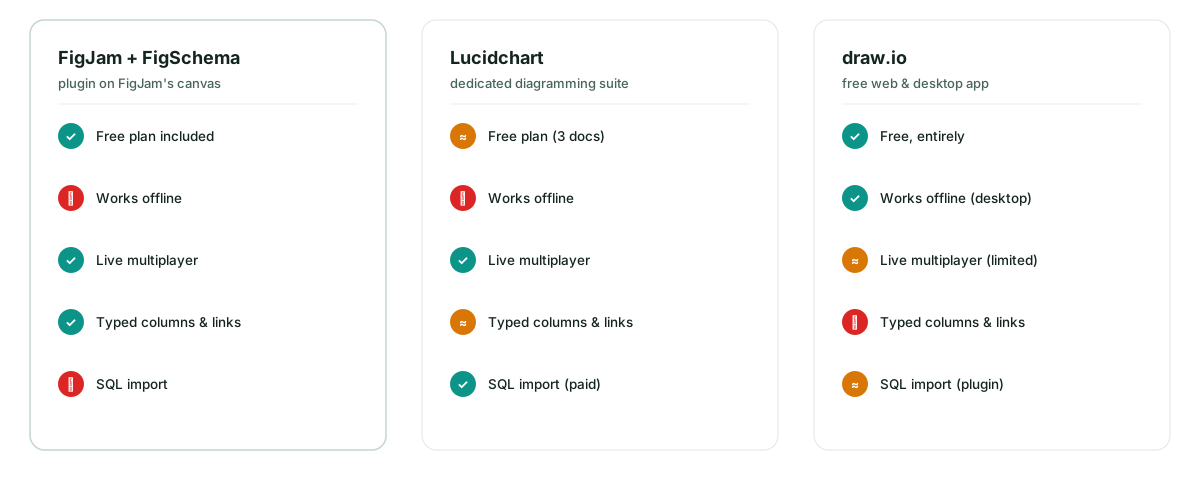
The one-minute verdict
| Pick this | If you… |
|---|---|
| FigJam + FigSchema | design schemas with a team, live, in the same place your product is already sketched |
| Lucidchart | need a dedicated diagramming suite with SQL import, org admin and compliance features |
| draw.io | want $0, no account, full offline - and accept generic shapes with no DB semantics |
Cost
| Free tier | Paid | |
|---|---|---|
| draw.io | everything, including the desktop app | only the Confluence/Jira integrations are paid |
| FigJam | starter tier with a small number of active files | roughly $5 per editor/month, billed annually |
| Lucidchart | about 3 documents | from roughly $9 per user/month |
(Pricing moves - treat these as ballpark and check the vendors' pages.)
draw.io is unbeatable on price: it's free, full stop. FigJam's free tier is enough to try the whole FigSchema workflow before anyone pays. Lucidchart's free tier is a demo - three documents fills up fast on real projects.
How database-aware is each tool
This is where the three philosophies really split.
draw.io ships an entity-relation stencil with proper crow's foot symbols, but the shapes are generic rectangles underneath. Nothing knows that a line is a foreign key, that a column is typed, or that moving a table should keep its relationships attached to the right rows. There's a community plugin for SQL import, and it works - with some assembly.
Lucidchart is genuinely database-aware: a real ERD shape library, and (paid tiers) SQL import that generates tables and relationships from an existing schema. If you're documenting a database that already exists, that round-trip is a legitimate superpower. Hand-sketching feels slower - it's a diagramming suite, built for polished output, not a whiteboard.
FigJam alone has no ERD support - that's the gap FigSchema fills. With the plugin you get typed columns, primary-key and foreign-key toggles, links anchored to the exact columns they reference (with crow's foot cardinality), color groups and one-click starter templates. What it deliberately doesn't have is SQL import: it's a sketch-first design tool, not documentation software.
Collaboration
Schema design is a conversation - "is an order ever shared between customers?" - and that argument happens fastest on a shared canvas.
- FigJam is multiplayer-first: live cursors, sticky notes, voting, emotes. Engineers, PMs and designers argue on the same board at the same time, and the diagram survives the argument.
- Lucidchart has solid collaboration - simultaneous editing, comments, presentation mode. It's polished rather than playful.
- draw.io real-time co-editing exists but is limited and depends on where the file is stored; in practice it's mostly a single-editor tool with comments.
Privacy and offline
- draw.io wins outright: the desktop app edits local files with no account at all - fine for air-gapped machines.
- Lucidchart is cloud-only with an account.
- FigJam is cloud-based too, but FigSchema itself makes zero network calls: your schema lives entirely inside your FigJam file, and deleting the plugin deletes nothing from the canvas.
When each tool plainly wins
Lucidchart, when you're reverse-engineering a large existing database from SQL, you need SSO and admin controls, or your company already has licenses nobody wants to duplicate.
draw.io, when the budget is zero, the machine is offline, or it's a one-off diagram that will never be edited again.
FigJam + FigSchema, when the schema is still being designed - when tables will be renamed, regrouped and argued over for weeks, by a team that's already living in Figma. Speed of iteration beats polish at that stage, and you can always redraw the final version elsewhere.
Try the FigJam way
The fastest test costs nothing: open FigJam, install FigSchema from Figma Community, and drop the e-commerce starter template on a blank board - then try the five-step sketch with your own tables. If moving a table and watching every relationship follow its columns doesn't sell it, Lucidchart and draw.io are still there.