
Many-to-many relationships and junction tables, explained simply
A foreign key is a single column, and a column lives in exactly one table.
That's why one-to-many is easy: orders.user_id points at users.id, done.
But "a student takes many courses, and every course has many students"
doesn't fit in any column. SQL has no courses[].
Never draw many-to-many directly
If a line in your diagram has a crow's foot on both ends, it can't become a foreign key - the diagram is telling you it's unimplementable as drawn. The fix is always the same: put a third table in the middle and split the relationship into two plain one-to-many links.
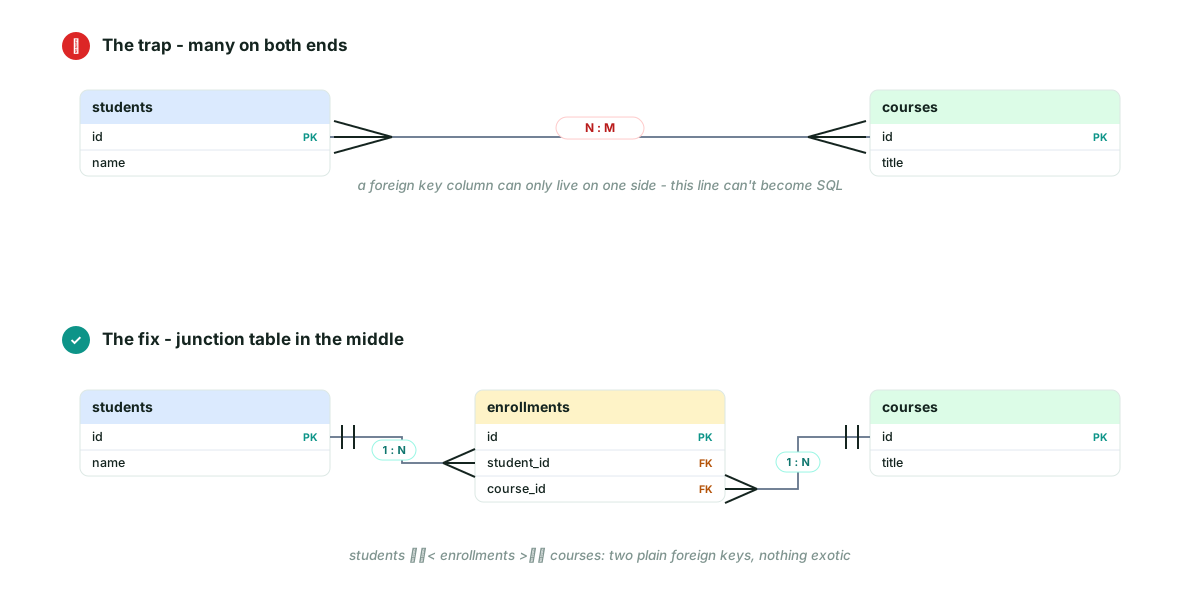
That middle table - enrollments - is the junction table (you'll also
hear linking table, join table, association table). Its whole job is to
hold pairs of foreign keys.
What the rows actually look like
This is where it clicks for most people: a junction table is just one row per pairing.
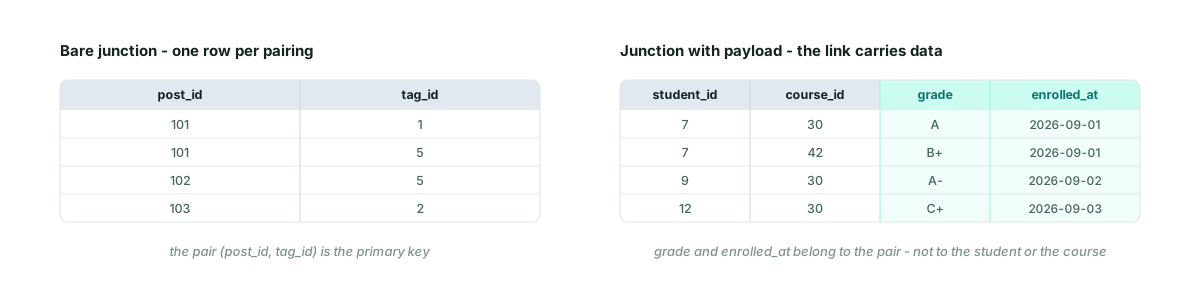
- Bare version (
post_tags): each row is one pairing, and the pair itself is usually the primary key. - Loaded version (
enrollments): same pairs, plus data that belongs to the link - not to either side.
Payload: the link itself has data
A grade doesn't belong to the student (they have many grades) or to the
course (many students earn different grades). It belongs to the pairing.
Same story with qty on an order line, or assigned_at on a role
assignment. Once you treat the junction table as a real entity with its
own columns - not a hack - you'll start noticing data parked on the wrong
table everywhere.
Four junction tables you'll actually build
| Junction table | Connects | Payload columns |
|---|---|---|
enrollments | students ↔ courses | grade, semester |
order_items | orders ↔ products | qty, unit_price |
post_tags | posts ↔ tags | none - bare pairs |
role_assignments | users ↔ roles | assigned_at, assigned_by |
How to spot it while sketching
Three tells, in the order they usually show up:
- A requirement sentence with "each … many … and each … many …" - students and courses, posts and tags.
- You catch yourself wishing for an array column (
tag_idson posts). Arrays of ids are the runtime hack; the junction table is the schema answer. - A line in your diagram with feet on both ends - the notation itself is the alarm.
When you hit one, don't redraw the two tables - drop a third in the middle, exactly like step five of the FigJam walkthrough.
Naming the middle table
If the pairing is a real-world thing, name it that: enrollments,
order_items, subscriptions. If it's just a pairing with no natural
name, table1_table2 (post_tags) is the common fallback. Skip suffixes
like _map or _link - they're noise.
Sketching this in FigJam? FigSchema anchors every link to the exact columns it connects - so when a relationship turns out many-to-many, dropping the junction table in the middle keeps both halves of the diagram truthful. Free, offline, no account.