
Database schema design basics for developers who wing it
Nobody teaches schema design. You learn it the way you learned git: by
recovering from disasters. So you wing it - open a migration, add columns
until the feature works, refactor "later." Sometimes later never comes,
and now orders has fourteen nullable columns and nobody remembers what
three of them mean.
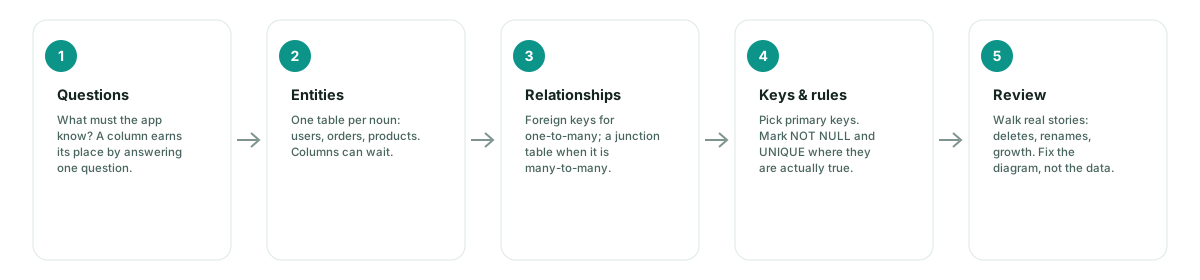
Here is the ten-minute version of the discipline you skipped. Five stages, no jargon walls.
1. Start from questions, not tables
Bad schemas come from copying the UI. Good ones come from questions: what must the app know, and what will it be asked?
"Who bought what, and when?" gives you orders with user_id and
created_at. "What did each item cost at the time of the order?" gives
you unit_price on the line item - a column you'd have missed if you'd
started by drawing boxes. A column that answers no question gets deleted
in the first refactor; it never earns its migration.
2. Entities: one table per noun
Read your questions back and circle the nouns: users, orders,
products, payments. That's your table list. Two rules of thumb:
- If you can't name an entity in one word, it's probably two entities - or a relationship pretending to be one.
- Skip columns entirely at this stage. Naming an entity wrong is cheap to fix on a canvas and expensive to fix after three migrations.
3. Relationships: the two shapes that matter
Almost everything is one of two shapes:
One-to-many - a foreign key on the many side.
orders.user_id → users.id. Done.
Many-to-many - no single column can hold it, so it gets a
junction table in the middle:
students ↔ courses becomes enrollments.
Draw them with crow's foot notation so the line itself carries the rule - "each order belongs to exactly one user," mandatory or optional, one or many. A diagram you can read out loud is a schema you can defend in review.
4. Keys and rules
Three decisions per table, made on purpose:
- Primary key. A surrogate
idis the safe default. Natural keys (email,sku) look clever until a supplier reuses SKUs. - NOT NULL by default.
NULLmeans unknown, not "empty" and not "zero" - allow it only when unknown is genuinely possible. - UNIQUE where true. Two users with the same email is a bug, not a coincidence; say so in the schema, not in a postmortem.
5. Normalization, minus the jargon
The whole idea fits one famous sentence: every non-key column depends on the key, the whole key, and nothing but the key. You don't need to recite normal forms - you need to recognize the smells:
| Smell | What it's telling you | Fix |
|---|---|---|
Numbered columns (item1, item2, item3) | a hidden one-to-many | move them to their own table |
| The same fact stored in two tables | updates will drift apart | one home per fact; reference it |
Columns in a table that describe something else (product_name inside orders) | dependency on the wrong key | split the table |
Denormalization is still a real optimization - later, on purpose, with measurements. Not by accident at 2am because a join felt slow.
6. Review: walk stories, not tables
Nobody finds bugs by reading a list of tables. Walk real stories across the diagram:
- A user deletes their account - what happens to their orders?
- A product gets renamed - do last year's order items change?
- A store exceeds its product limit - what enforces that?
Each story either passes or the diagram changes - and changing a diagram costs minutes, while changing a live table costs a migration and an outage window. Run this with someone else on the same canvas (any shared whiteboard works; the shared part is the point).
The whole flow on one board
This loop - questions, nouns, lines, keys, stories - fits on one canvas and one meeting. That's exactly what FigSchema is for: sketch the entities, connect exact columns, read the crow's foot out loud, then walk the stories with the team before any of it becomes SQL. Start from the five-step FigJam walkthrough or drop a starter template and adapt it.